NaviGatr: AI Assitance for Visually Impaired
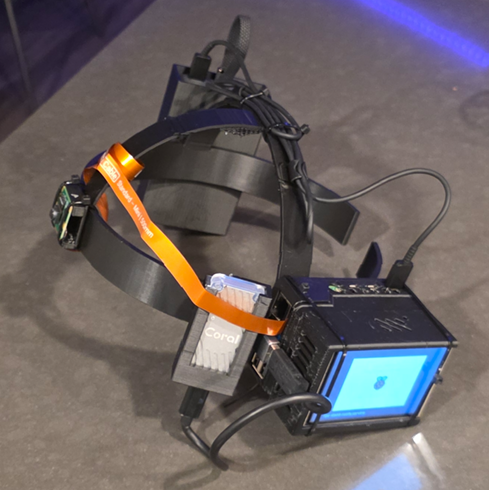
NaviGatr is a project that aims to aid the visually impaired using various computer vision algorithms. While prior systems have used object detection or depth sensing independently, a combined real-time approach has not been widely implemented.
🌐 View on GitHub📄 PDFs
🧊 STL Files (viewable)
📚 Docs
NaviGatr: Wearable AI Navigation Assistant for the Visually Impaired
Introduction
NaviGatr is a project that aims to aid the visually impaired using various computer vision algorithms. While prior systems have used object detection or depth sensing independently, a combined real-time approach has not been widely implemented.
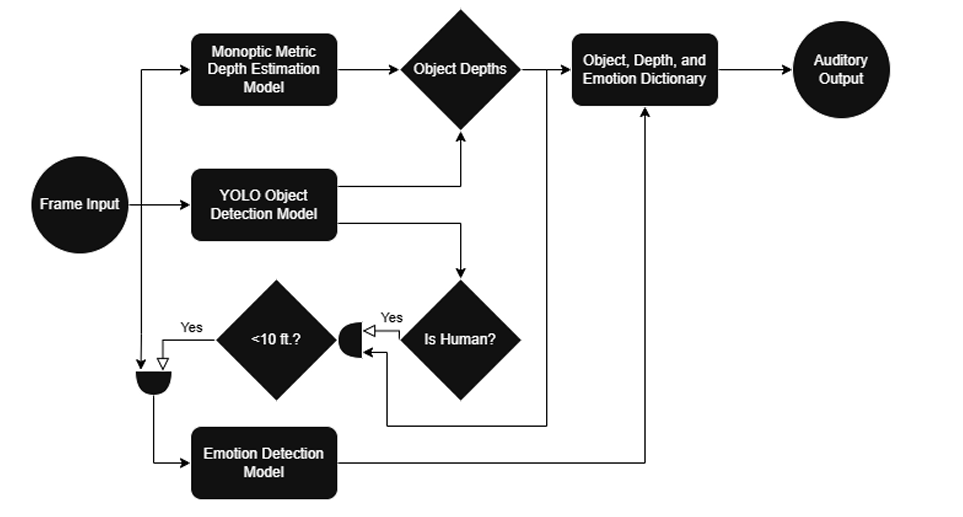
Our system uses three different machine learning models to extract spatial and contextual data from camera frames captured at eye level via a wearable headset. These models perform:
- Object detection
- Monocular depth estimation
- Emotion recognition
The output of these models is aggregated, interpreted, and passed to an output module — currently implemented as a voice assistant — which guides the user with auditory cues about their surroundings.
🔦 Computer Vision Models
🔍 Object Detection
We use different object detection models based on platform constraints:
- On Windows and higher-powered PCs, we run YOLOv11n (from Ultralytics), which offers fast and accurate detection across 80 COCO classes.
- On the Raspberry Pi 5 with Coral TPU, we use SSD MobileNet V2, a lightweight model optimized for edge inference.
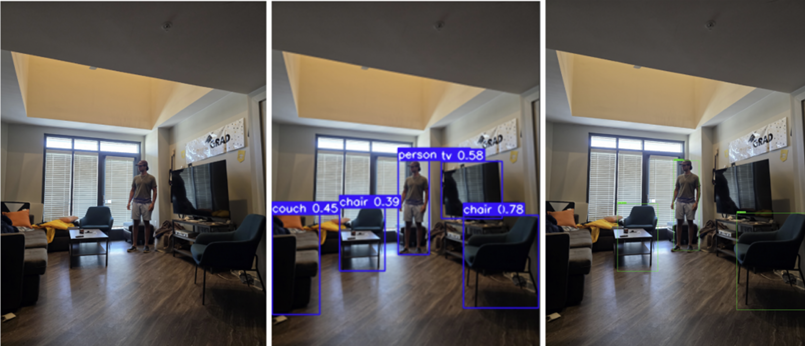
Both models return bounding boxes and class labels which are combined with depth data to localize and describe objects to the user in real-world terms.
😐 Emotion Detection
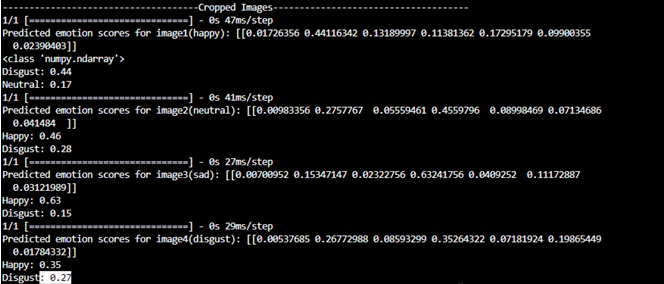
We trained a custom model based on the FER2013 dataset, using the EfficientNetB0 architecture. This model runs on the Coral TPU and:
- Accepts cropped 256x256 RGB facial images
- Classifies emotions such as happy, sad, angry, disgust, etc.
- Triggers only when a person is nearby (~10 feet)
This allows NaviGatr to add social context to the user’s environment.

📏 Depth Sensing
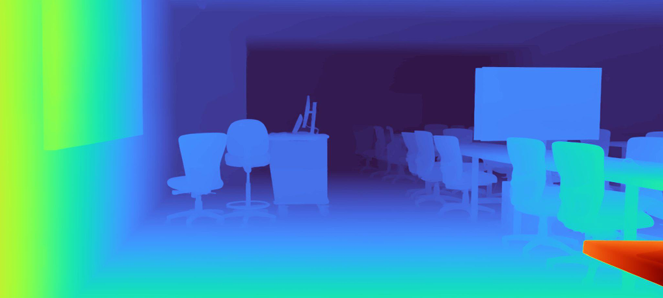
We use Apple’s Depth Pro model — a monocular depth estimation model that returns absolute metric depth, unlike most models that return relative depth.
- Deployed on a GPU cloud instance (AWS EC2)
- Receives images from the Pi over HTTPS
- Returns a dense depth map and focal length for use in positioning
Depth Pro uses a transformer-based architecture and produces sharp gradients and accurate boundaries. The results are used to locate how far away each object is in meters.
🔊 Output Handling
This is how we handled output delivery in NaviGatr:
The object detection model returns an array of bounding boxes, each containing (x, y) coordinates relative to the camera image. Meanwhile, the depth estimation model outputs a dense depth map containing the estimated distance (in meters) for each pixel.
🧮 Determining Object Depth:
- For each object’s bounding box, we isolate the corresponding sub-array in the depth map.
- We select the minimum value within this sub-array to approximate the object’s nearest point.
- This gives us a real-world distance to each object.
🕒 Spatial Orientation:
- We divide the image horizontally into four quadrants to mimic a clock-based directional guide.
- Depending on the x-coordinate of the bounding box center, we label objects using clock directions like:
- 10 o’clock, 11 o’clock, 12 o’clock, 1 o’clock, 2 o’clock
- This makes the system more intuitive for the user.
Example: If a chair is detected with its bounding box centered near the left-middle of the image and its depth is 2 meters, the audio output will be:
"Chair, 11 o'clock, 2 meters away"
🙂 Emotion Awareness:
- If the detected object is a person, their cropped bounding box is passed to the emotion detection model.
- The model returns the emotional state, which is appended to the output.
Example: If a sad person is detected at the right side:
"Person, 1 o'clock, sad"
The output is then synthesized into speech and delivered via audio for real-time navigation assistance.
🛠️ Hardware Overview
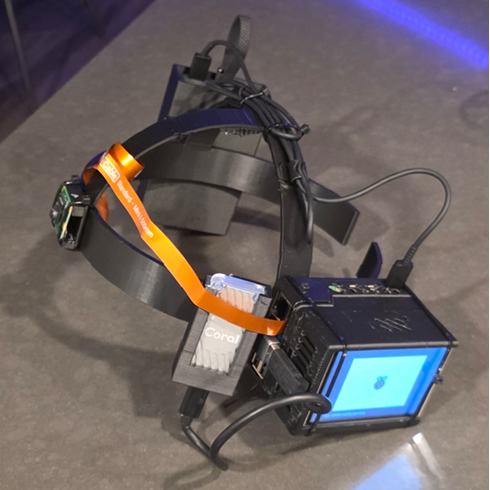
Raspberry Pi 5
- 8GB RAM
- Quad-core Cortex-A76 CPU (64-bit)
- Runs Ubuntu 24.04 LTS (Lite) for edge performance and compatibility
Pi Camera
- Mounted front-facing at eye level
- Captures real-time frames at 30 FPS
- Connected via a long ribbon cable
Coral TPU
- USB accelerator for running TFLite quantized models
- Enables real-time inference for object and emotion detection
GPIO Display
- 3.5" touchscreen for demonstration and debugging
- Displays bounding boxes, logs, and FPS rates
Power Bank
- 10,000 mAh Anker bank with USB-C output
- Powers the Pi, TPU, fans, and display
3D Printed Headband
- Custom CAD design with:
- TPU holder
- Battery holster
- Pi + Fan housing
- Balanced, ergonomic fit
- Printed using PLA with rounded edges for safety
- Fans positioned for thermal regulation
🔗 Further Docs & Resources
📂 Raspberry Pi 5 Setup & Firmware
Full walkthrough for flashing Ubuntu, installing dependencies, setting up camera access, and running the core script.
⚡ Wiring & Power Guide
Wiring diagrams for GPIO display, fans, Coral TPU, and safe USB-C routing.
📽️ 3D Design & Hardware Assembly
STL files, CAD renderings, and assembly instructions for the NaviGatr headset.
📄 Final Report (PDF)
Complete engineering report including benchmarking, design decisions, and testing plans.
📚 GitHub Repository
Codebase for the models, hardware integration, and deployment scripts.
🎥 Demonstration Video
(Coming soon) Live test run of NaviGatr navigating a test environment.
👥 Team Members
- Naitik Gupta — Emotion detection, Pi integration, hardware design, overall integration
- Micah Wright — Object detection, documentation, camera logic
- Eliav Hamburger — Depth estimation, cloud backend, testing and validation
NaviGatr pushes the boundary of accessible computing, demonstrating how on-device machine learning and thoughtful hardware design can empower a community often overlooked by mainstream tech.